
LawTrak Next-Gen
Move Forward with LawTrak Next-Gen, Powered by ARMS. A modern platform built for South Carolina Public Safety.





Why Make the Switch Now?
ARMS is more than just an upgrade — it’s the future of LawTrak. With SC-specific functionality, unmatched support, and secure cloud-based infrastructure, migrating now ensures your agency benefits from long-term performance, innovation, and compliance.
Built for SC Agencies
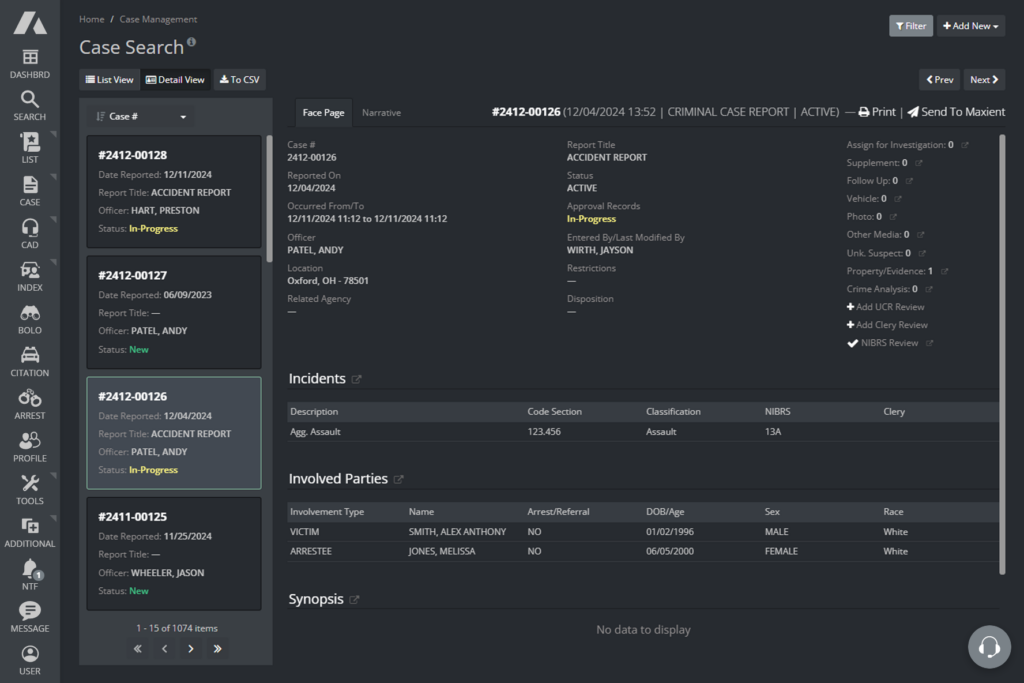
ARMS comes pre-configured with modules purpose-built for South Carolina, including SCUTTIES, Public Contact, and Municipal Court.
By aligning with state-specific needs, ARMS preserves your familiar workflows while enhancing them with faster performance, real-time insights, and integrated case management tools — all within a unified, secure platform.

Value that Grows with You
While ARMS introduces new pricing, it delivers significantly greater value.
You’ll benefit from modern, cloud-native architecture, continuous product development, compliance, and 24/7/365 support.
The transition is fully guided — from data migration to training — giving your agency a stronger foundation for growth and accountability.
Don’t Miss Out! Now is the time to modernize your public safety operations.
Contact ARMS to Learn More!
The LawTrak Next-Gen Roadmap
Start of 2026
Stabilize & Communicate
- LawTrak is still in operation
- Confirm contacts / usage patterns
- Understand audit posture & dependencies

Next 6 – 12 Months
Plan & Prepare
- Define scope (active vs archive)
- Plan interoperability needs (courts, evidence tracking, reporting)
- Align to budget and audit cycle

Through 2026
Migrate & Modernize
- Provision ARMS environment (if / when chosen)
- Data preservation and cutover
- Training and validation
- Decommission LawTrak when agency is ready

Post-Migration
- Modern CJIS-aligned SaaS with ongoing updates
ARMS has been a game-changer for our agency. The system is intuitive, responsive, and clearly built with public safety in mind. We’ve seen major improvements in how we manage records and respond to calls — and the support team has been outstanding every step of the way.

LawTrak → ARMS Roadmap FAQ
-
NO, LawTrak remains operational & supported. There is no immediate shutdown or forced replacement. ARMS’ role is to support & provide a path forward.
-
NO, Agencies can continue using LawTrak while planning next steps on a timeline that aligns with audits, staffing, and budgets.
-
ARMS meets current CJIS requirements and operates within a security environment that has been independently audited under SOC 2 Type II, providing third-party validation of its security controls.
-
Preservation of historical records is a core principle. Data planning is handled based on agency needs and audit requirements.
-
NO, ARMS’ transition approach avoids double-paying during the transition period. There will be no changes to your current cost.
-
For common RMS use cases, YES, and we validate any agency-specific workflows during planning.
-
Court-related capabilities and integrations are in progress; we’ll confirm scope and timing based on your local requirements.
-
SCUTTIES workflow support is in progress; we’ll validate your submission, acknowledgements/errors, and reporting needs during planning.
-
YES. Optional webinars and demos are available for agencies evaluating timing and requirements.
-
ARMS is a cloud-based platform with hosting, security, maintenance, and continuous updates included; scope and options are reviewed during planning.
-
For continuity & transitional clarity, we’ll address agency-specific questions 1-on-1.
Our support team is available Monday through Friday, 8:00 AM – 6:00 PM (EST).
Phone: 1-800-776-6783, ext. 2
Email: support@arms.com
LawTrak Downloads & Updates
-
Answers to the Criminal Justice Information Technology Security Audit
Some answers to the Criminal Justice Information Technology Security Audit that SLED sends out.
-
Answers to the SCIBRS Questionnaire
Answers to the SCIBRS Questionnaire that SLED sends out.
-
A complete set of installation files for Servers, Workstations, and Remotes
Guide For Installation – If your agency has had workstations installed by LawTrak Support, the setup files will be available on your server.
-
SCIEx and Additional Apps
**These programs should be installed on the server by LawTrak Tech Support**
LawTrak Additional Apps – This file is set to extract to the C:\NBSPOLICE\LAWTRAKAPPS\ directory.
SCIEx Uploading Program Setup – This will install the Windows Service needed to upload the XML files created by the Apps program to the Fusion Center
.NET 2.0 Upgrade – If you are using an old version of Windows Server, you may need this if the Uploading Program will not run.
Windows Installer 3.0 – If you are using an old version of Windows Server, you may need to install the Windows Installer
.NET Uninstaller – This should only be used if your .NET files on the server have become corrupt. This only uninstalls up to .NET Version 4.
-
Barcode Font – This is used for the Evidence Module Barcodes. Run or Open the link above. This will unzip to the c:\nbspolice\ directory. Go to the Control Panel, Fonts, and install the font from the NBSPOLICE directory.
Adobe Acrobat 3 Folder – This will unzip the Acrobat folder.
LawTrak/WTH GPS Program – This will unzip the files necessary for LawTrak to take direct readings from an attached Garmin GPS unit and to interact with the WTH Mapping Program. There are some additional steps needed to finish setting up this program, so please call either us or your WTH representative.
Arial Narrow Font – This will unzip to the c:\nbspolice directory. Go to the Control Panel, Fonts, and install the font from the NBSPOLICE directory.
Print Screen Program for Windows – Save this to your desktop and run it to enable the Print Screen button to work in Windows.
Dual Task Bar OCX – mscomctl.ocx – This file should be downloaded to the default NBS Modules directory if the dual task bar is not working correctly.
Drivers License Scanner OCX – mscomm32.ocx – Unzip this file to c:\nbspolice\ folder if the Drivers License COM Port Scanner setup gives you an error
PrimoPDF Printer Driver – This is an easy way to create PDFs by just printing to this printer driver.
Adobe Reader XI – This is the last decent version of Adobe Reader that doesn’t cause a ton of problems.
Topaz Digital Signature Pad
These files are used to set up the Topaz Signature Pads to take into certain LawTrak forms. We only support Topaz signature pads, although others may be able to be used.
Honeywell Xenon License Scanner Files
These files are used to set up the Honeywell Xenon Barcode Scanners to scan Drivers Licenses into LawTrak.
Xenon and 1900 MANUAL – USB Serial Barcode – Page 2-4 – 30th Page in File
4800 Manual – USB COM Port Emulation Barcode – Page 1-10 – 26th Page in File
USB to COM Driver (Old)
USB to COM Driver (New)^If Needed – Run as Administrator for 32-bit or 64-bit Operating System
Xenon 1900 Configuration Tool – Just in case you have an unformatted reader
Raco Scanner Drivers
This forces the Raco Scanner onto COM 9
-
These are the handouts that we use in our Training Classes at our office.
File Name Microsoft Word File PDF File 01 – Start (2 pages) Microsoft Word Format PDF Format 02 – Setups (8 pages) Microsoft Word Format PDF Format 03 – Additional Setups (19 pages) Microsoft Word Format PDF Format 03a – Warnings and Alerts (2 pages) Microsoft Word Format PDF Format 03b – User Names and Passwords (4 pages) Microsoft Word Format PDF Format 03c – Officer Setup (2 pages) Microsoft Word Format PDF Format 03d – Statutes and Ordinances (3 pages) Microsoft Word Format PDF Format 03e – Traffic Offense Codes (3 pages) Microsoft Word Format PDF Format 03f – NIBRS Codes (1 page) Microsoft Word Format PDF Format 03g – Disposition Setup (1 page) Microsoft Word Format PDF Format 03h – Custom Letter Setup (2 pages) Microsoft Word Format PDF Format 03i – Uniform Traffic Ticket Inventory (2 pages) Microsoft Word Format PDF Format 04 – Basic Data Entry (15 pages) Microsoft Word Format PDF Format 05 – Courtroom (18 pages) Microsoft Word Format PDF Format 06 – Financial (12 pages) Microsoft Word Format PDF Format 07 – Incident Reports (5 pages) Microsoft Word Format PDF Format Class Outline Microsoft Word Format PDF Format -
Click on the link below for the upgrade you’re looking for. If you get the option to Run the file, select Run. If you must save the file, press Ctrl+J after it has finished downloading to see the downloads, then run.